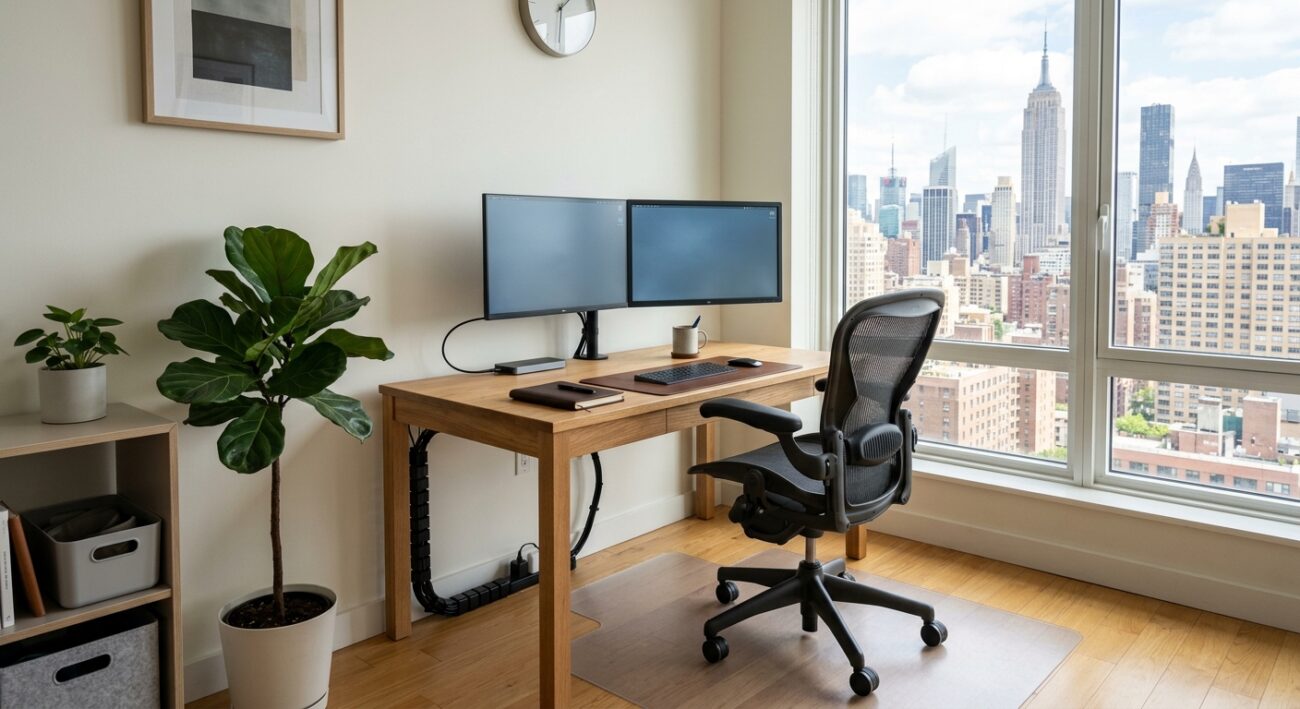
For a lot of New Yorkers, the home office is not a room. It’s one end of the dining table, a desk wedged between the bed and the window, or a laptop on the kitchen counter that gets cleared off every evening for dinner. The desk is also where you eat lunch, drink three coffees, take calls with your camera on, and at 6 p.m. stack the day’s paper in a pile you will deal with tomorrow.
It’s an odd kind of room. You spend more waking hours at it than at almost anything else in the apartment, yet it’s the place most likely to be skipped when you clean. The desk gets wiped when something spills. The monitor gets wiped when the dust becomes embarrassing on a video call. The cables behind it get looked at roughly never.
A tidy desk helps you think, and a clean one is better for your health and your equipment. But “clean the office” is a vague instruction, and the wrong products can quietly ruin a screen or a chair. This guide breaks the job into pieces, covers what’s safe to use on what, and gives you a routine small enough to survive a real work week.
Why a home office gets dirtier than you think
Three things make a workspace at home grubbier than other surfaces in the apartment.
It’s used all day. A sofa gets a few hours of use. A desk chair, a keyboard, and a mouse get eight or more, often in the same hands that just handled lunch.
Food and work share the same surface. Crumbs in a keyboard, coffee rings on paper, a sandwich wrapper next to a laptop, a half-finished mug of tea from yesterday. In small apartments, there’s rarely a separate eating spot.
Electronics attract dust. Screens carry a static charge. Fans pull room air through laptops, towers, and routers, and everything inside collects lint. Cable bundles on the floor hold a surprising amount of dust.
None of this is dangerous. It’s just the layer of grime that builds up on anything you touch a thousand times a day, and the fix is small, regular, and specific to what each item is made of.
Before you start: the ground rules for electronics
Electronics have a short list of things they hate, and every cleaning mistake with them breaks one of these rules.
- Power down and unplug first. For anything you’re going to wipe, turn it off, and for desktop equipment, unplug it.
- Never spray liquid directly onto a device. Apply it to a cloth, then wipe. Liquid that runs into a seam, vent, or port can end the life of the device.
- Use microfiber. Paper towels and tissues can scratch coatings and leave fibers.
- Avoid ammonia, bleach, and harsh solvents on screens and plastics. Many screens have coatings that strip off.
- Keep moisture away from openings, meaning ports, vents, speaker grilles, and the gaps around keys.
- Check the manufacturer’s care page for anything expensive. Some brands publish exact guidance.
With that in mind, here’s how to handle each part of the office.
The desk surface
A desk is usually wood, laminate, glass, or metal, and the same rules apply as for any other surface of that type.
- Clear everything off. Move the laptop, the notebook, the mug, the pen holder. Put things on a chair or a nearby surface.
- Dust first, dry. A dry microfiber cloth or a soft brush picks up loose dust and crumbs. A damp cloth on top of dust makes a paste.
- Wipe with a damp cloth and a drop of mild dish soap in warm water. Wring the cloth out well so it’s barely wet.
- Dry with a second cloth, especially on wood and laminate, where water can leave marks or swell edges.
- Check the edges and underside, where hands rest and crumbs hide.
Wood desks can take a light polish a couple of times a year. Glass desks show fingerprints, and a glass cleaner sprayed on a cloth (not the desk) works well. Laminate hates standing water at seams, so don’t let spills sit. If you’re not sure what product is safe, our guide to cleaning versus sanitizing versus disinfecting explains when a simple wipe is enough and when you need a disinfectant.
Screens: monitor, laptop, tablet
Screens are the most commonly damaged item in the room, and almost always by a well-meaning person with the wrong spray.
- Turn the screen off. A dark screen shows the smudges and dust you’re trying to remove.
- Dust first with a dry microfiber cloth, using gentle strokes.
- If smudges remain, dampen a microfiber cloth with plain water, or a mix of equal parts distilled water and white vinegar if the manufacturer allows. Wring it until it’s barely damp. Wipe gently.
- Dry with another clean microfiber cloth.
- Skip glass cleaner, ammonia, alcohol on anti-glare coatings, paper towels, and any pressure. Pressing hard on an LCD can damage the pixels underneath.
Check the care instructions for your screen. Some matte or coated displays are more sensitive than glossy ones.
Keyboard, mouse, and other things your hands touch
This is where the real grime lives. A keyboard collects skin oils, food residue, hair, and dust, and the surface of a mouse picks up oil from your palm.
Keyboard:
- Unplug it, or turn off a wireless one and remove batteries if you can.
- Turn it upside down and tap gently to loosen crumbs.
- Use short bursts of compressed air, holding the can upright, to blow debris out from between keys.
- Wipe the key surfaces with a cloth lightly dampened with 70 percent isopropyl alcohol (apply it to the cloth, not the keyboard). Many manufacturers, including Apple, list 70 percent isopropyl alcohol wipes as acceptable for hard, nonporous exterior surfaces. Avoid bleach, and don’t let liquid run into the gaps.
- Let it dry fully before using it again.
Mouse and trackpad: wipe the surface with a lightly dampened cloth. Clean the feet and the sensor opening with a cotton swab if the cursor drifts or sticks.
Mouse pad: fabric pads can go through a gentle wash. Hard pads wipe clean with a damp cloth.
Phone, desk phone, and headsets: these touch your face and mouth and deserve the same attention. Wipe the ear pads and the microphone area of headphones with a damp cloth, and check the manufacturer’s note on cleaning fabric or foam pads.
Webcam lens: a lens cloth or dry microfiber is enough. A smudged lens is often why your video looks soft.
Cables, power strips, and the floor behind the desk
This is the part of the office nobody looks at, and it’s the dustiest.
- Unplug before you clean. Never wipe a plugged-in cable or power strip with a wet cloth.
- Vacuum along the baseboard and around cable bundles with a brush attachment. Dust that settles on cables is a pest magnet and a fire concern around power strips.
- Wipe cords with a dry or barely damp cloth. Dust sticks to static.
- Check power strips and surge protectors for dust buildup around the sockets and switches, and make sure nothing is running hot.
- Tidy while you’re there. A few reusable cable ties or a cable sleeve make the next cleaning faster and let you vacuum under the desk without a tangle.
If your apartment has a window AC near your desk, keep cords away from the drip path under the unit.
The chair
The chair is the most used and least cleaned piece of furniture in the office. Body oils, sweat, food spills, and skin cells collect in the seat and arms.
The right method depends on the material.
- Fabric: check the tag under the seat. The letter code tells you what’s safe. W means water-based cleaners, S means solvent-based, WS means either, and X means vacuum only. Vacuum with a brush attachment first, then spot clean following the code. Test somewhere hidden.
- Mesh: vacuum, then wipe with a damp cloth and a bit of mild soap. Let it dry.
- Leather and faux leather: wipe with a damp cloth and mild soap, then dry. Avoid alcohol and harsh cleaners, which can dry out the material and cause cracking or peeling.
- Plastic and metal parts: wipe the arms, base, and wheels with a damp cloth. Wheels collect hair and lint. Pull it out with tweezers or scissors.
If the chair smells, sprinkle baking soda over fabric, leave it a few hours, and vacuum it up.
Paper, clutter, and the ‘pile’
Dust and dirt are only part of the problem. Paper clutter makes a desk harder to clean because you can’t wipe what you can’t reach.
- Pick one spot for incoming paper, and process it on a regular day.
- Shred or recycle what you don’t need. Scan what you do.
- Keep surfaces free except for what you use every day.
- Drawers collect crumbs and old pens. Empty one every few months and wipe the inside.
A desk that can be cleared in ninety seconds is a desk that gets cleaned.
Air, light, and the room itself
An office-in-a-bedroom or an office-in-a-living-room shares air with the rest of the apartment, and it’s worth a thought.
- Ventilate. Open a window for ten minutes in the morning. Stale air in a small room makes everything feel heavier.
- Dust the shelves, monitors, and lamp shades. Static pulls dust to all of them.
- Use a humidifier carefully in winter, and clean it often. A dirty humidifier is worse than none.
- Plants add life to a desk, but check for overwatering and spilled soil.
- Keep heaters away from paper and cables, and don’t leave space heaters running unattended.
The video call background
If your day includes video calls, the thing behind you is part of the office. Cleaning it takes five minutes and is the fastest way to make a small apartment look composed on camera.
- Look at your frame, not the room. Open your camera and see what actually shows. A pile of laundry two feet outside the shot doesn’t matter. A dusty shelf directly behind you does.
- Clear the visible surfaces. Shelves, window sills, and the top of a dresser behind you should hold a few things, not twenty.
- Wipe the lens and the screen before an important call. A smudge on a webcam makes the picture look soft in a way no lighting fixes.
- Check the light. A window behind you turns you into a silhouette. A lamp in front of you, or facing the window, works better, and dusty lamp shades dim the light.
- Watch for the stray. Mugs, takeout containers, and the charging cable draped across the desk all show up in the frame.
Sick days, shared desks, and when to disinfect
If someone in the apartment is sick, the home office is one of the easiest places for germs to move around, because everything is touched with hands that touch faces. Keyboards, mice, phone screens, headsets, and door handles are the main culprits.
In that case, cleaning is not enough, and disinfecting makes sense. Use the approach in the product’s directions: wipe with soap and water first if the surface is visibly dirty, then apply the disinfectant and leave it wet for the contact time on the label. For electronics, stick to the manufacturer’s guidance (many accept 70 percent isopropyl alcohol on hard, nonporous exterior surfaces), and skip anything that could get into ports or openings.
If you share a desk with a roommate or partner, the same logic applies in everyday life. Agree on a simple rule: each person wipes the surface they used at the end of their session. It takes thirty seconds and prevents the slow buildup that eventually turns into an argument.
Paper dust, printers, and the shredder
Printers and shredders produce fine paper dust, which settles on everything nearby. If you print or shred at home, put the machine on a surface you can wipe, not on top of a bookshelf where dust collects. Wipe the outside every week or two, and follow the manufacturer’s guidance for emptying the shredder bin and oiling the blades.
Paper itself gathers dust and holds odors. Old papers stacked in a corner are one of the reasons a home office can feel stale. Clear the stack regularly, and keep anything you need in a closed box or a drawer, not an open pile.
A routine that survives a real week
You don’t need a big project. You need a short routine you’ll actually do.
Daily, two minutes at the end of the day:
- Take mugs, plates, and wrappers to the kitchen
- Clear paper into one pile or tray
- Wipe the desk with a dry or barely damp cloth
Weekly, ten minutes:
- Wipe the desk with mild soap and water
- Dust the screen and the keyboard
- Wipe the mouse, phone, and headset
- Empty the wastebasket
- Vacuum around the desk and under the chair
Monthly, twenty to thirty minutes:
- Clean the keyboard with compressed air and a lightly dampened cloth
- Clean the cables and power strips
- Wipe the chair and clean the wheels
- Dust shelves, lamps, and monitor stands
- Empty and wipe a drawer
Seasonally:
- Pull the desk out and clean behind it
- Wash the mouse pad, desk mat, and any chair cover
- Check cables for fraying
If you’re trying to fit this into a packed schedule, our guide to keeping your apartment clean when you work full time shows how to attach cleaning to habits you already have.
Small apartment, one-room office
If your desk shares a room with a bed or a dining table, the rules shift a bit.
- Separate food and work. Clear the desk before you eat, or eat at the table. Crumbs in a keyboard are a lot harder to remove than crumbs on a plate.
- Make the office disappear at night. A cover or tray that holds the laptop and papers makes it easier to relax in the same room and clean the surface.
- Use vertical space. Wall shelves and monitor stands keep things off the desk so you can wipe it.
- Give everything a home. A tray for pens, a box for chargers, and a shelf for the notebooks you use. Items with no home end up on the desk, and a desk with twenty objects on it is a desk nobody wipes.
- Mind the bed. If your desk is within a few feet of where you sleep, keep food and drinks off it at night and close the laptop. Dust and crumbs from the work area travel to the bedding faster than you’d think.
Our piece on studio apartment cleaning in NYC has more on making one room do several jobs.
The short version
A clean home office comes down to small, regular habits and the right product for each item. Wipe the desk, dust the screen with a dry microfiber cloth, clean the keyboard monthly, keep cables and power strips free of dust, check your chair’s care tag, and spend two minutes at the end of the day putting things away. Keep liquids off electronics, skip harsh chemicals, and if something is expensive, check the manufacturer’s care page first.
Not Sure What You Need?
Tell us about your space — we'll recommend the right service and give you a free, no-obligation quote.
Get a Free Consultation